Coaching Software Tools Compared
TL;DR. Coaching software tools compared honestly split into two kinds: training-only tools that deliver a programme well, and whole-picture tools that hold training alongside nutrition, sleep and recovery. Neither is wrong. The right one depends on whether the stalls you actually see in your clients are about effort, or about everything around the effort.
What "coaching software tools" usually means, and what it leaves out.
Most comparisons of coaching software line up feature lists: templates, messaging, payments, reporting. Useful, and it misses the real question. What decides whether a tool serves your coaching is what it can see about a client beyond whether they did the set.
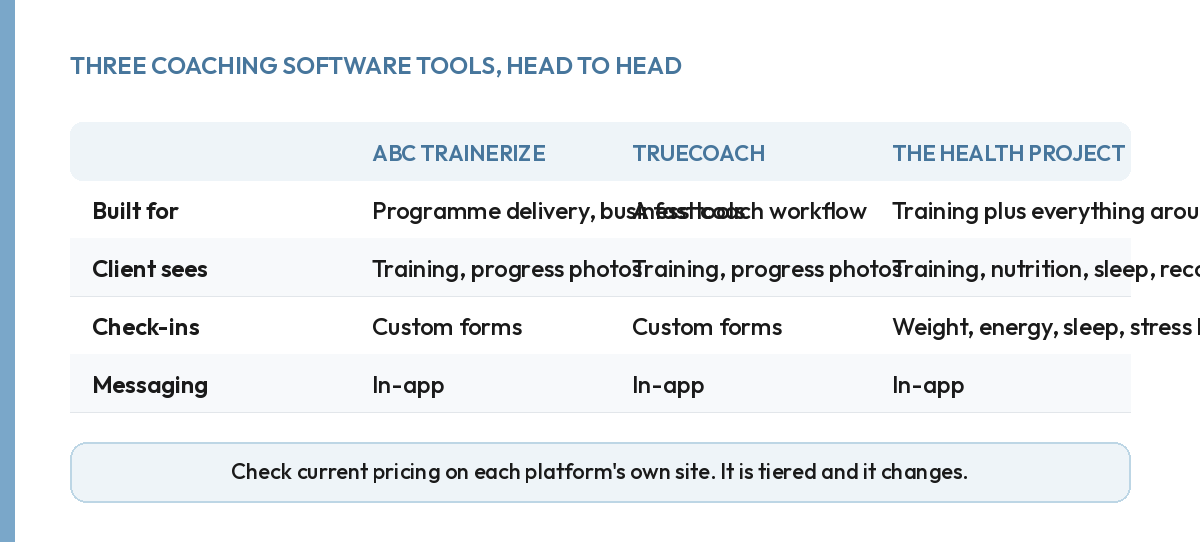
ABC Trainerize and TrueCoach are both built around delivering a programme and tracking that it happened. Both are established, both have a straightforward coach workflow, and both do the training side of the job well. Where they stop is the same place: once the programme is delivered and logged, the tool has told you everything it knows.
The Health Project, which we make, holds training down to the set. Nutrition is logged from a photo or the food library, sleep is pulled in from a watch or ring, and a weekly check-in covers energy and stress as well as weight. The comparison is not "more features". It is a different answer to the question of what a coach actually needs visibility into.
Where a training-only tool wins.
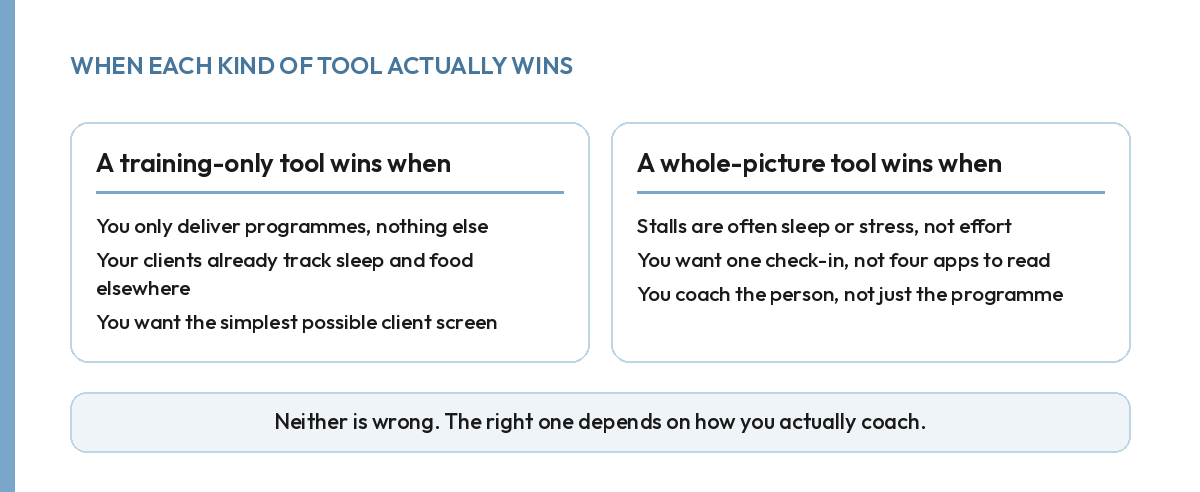
Honestly, sometimes it is the right call. If every one of your clients already tracks sleep and food somewhere else, and you only need to deliver and log a programme, a training-only tool gives you that. It is less to learn, and less for the client to open. Simpler is not automatically worse. It is worse only when the thing it leaves out is the thing that was actually stalling your client.
Where holding the whole picture wins.
Most stalls are not a training problem wearing a training log. A client who sleeps five hours a night and eats far under their target will look, in a training-only tool, exactly like a client who simply is not trying. The same gap shows up whenever a coach reads only the log rather than the client. A tool that holds sleep, nutrition and recovery next to the training gives you the context to answer the right question instead of the wrong one.
What actually costs you time either way.
Neither kind of tool saves you time on its own. The rhythm you run around it decides whether a roster of twenty clients takes you five hours a week or twenty. A whole-picture tool without a set weekly rhythm is still a pile of dashboards you never open on time. A training-only tool used well, on a fixed schedule, will outperform a feature-rich one used chaotically.
Pricing tells you less than it looks like it should.
All three of these platforms price by active client count, so a direct dollar comparison at any one roster size is nearly meaningless. It changes the moment your roster does, and it changes again if a platform revises its tiers, which happens more often than any comparison page keeps up with. Check current pricing on each platform's own site before you decide, and treat any number in a comparison, including this one, as a snapshot rather than a quote.
The more useful comparison is what you get at the price, not the price itself. A cheaper training-only tool is not automatically the better deal. Not if it leaves you doing, by hand, the exact tracking a slightly pricier tool would have done for you. Price the admin hours it removes, not just the invoice.
Switching later is real, but it is not a reason to freeze.
Coaches change tools more often than the marketing for any of them suggests. Usually a gap only becomes obvious with real clients on the platform for a few months. Ask, before you commit, what happens to a client's history if you move on: their programme, their check-ins, and their sleep and nutrition data if the tool held any. A tool that makes this easy to check is a better sign than one that avoids the question, whichever of these three you end up choosing. None of this is a reason to stall on picking one. It is a reason to pick with your eyes open.
So which of these coaching software tools should you actually pick?
Whichever one matches how you actually coach. If your clients' stalls are almost always about missed sessions and nothing more, a training-only tool is a genuinely fine, cheaper choice. If your coaching already involves asking about sleep, stress and eating, a tool that was never built to hold those answers will not help. It keeps that context stuck in a side conversation instead of the record you actually work from.
Try before you decide, on all three. Log a real session, fill in a real check-in, and look at what each tool shows you a week later. The comparison that matters is not the feature list on a sales page. It is which screen actually tells you why a client's week went the way it did.
This is the gap our own coach platform was built to close: training, nutrition, sleep and recovery held in the one place a coach actually checks.
FAQ.
Is a training-only coaching tool ever the right choice?
Yes. If you only deliver programmes and your clients already track sleep, food and stress elsewhere, a simpler training-only tool can be exactly enough.
What is the honest difference between these coaching software tools?
Mostly what the client sees beyond the training itself. Training-focused tools deliver programmes well. Fewer of them hold sleep, nutrition and recovery in the same view.
Does more features always mean a better coaching tool?
No. A tool with features you and your clients never open is not better, it is just more expensive and more to learn for no return.
How should I actually decide between coaching software tools?
By how you coach, not by a feature count. If stalls in your roster are usually about effort, a training-only tool covers it. If they are usually about sleep, stress or eating, they will not.