Health Tracker Apps: How to Choose One
TL;DR. Most people do not use one health tracker. They use four, each holding a piece, none of them talking to the others. Training in one, nutrition in another, sleep in a third, blood results in a photo on their phone. Health tracker apps are supposed to fix exactly this, and the single most useful feature in the category is not a feature at all. It is whether everything lands in the same place. One honest note, we make one of the apps in this category.
The problem this category is supposed to solve.
Your training affects your sleep. Your sleep affects your training. Your nutrition affects both. Your blood markers move slowly underneath all of it.
Every one of those relationships is invisible if the four things live in four apps. You end up with four accurate records and no answers. Your sleep was bad on Tuesday and your squat felt heavy on Wednesday. Nothing puts those two facts next to each other. That line between them is the entire point of tracking your health in the first place.
What to actually judge an app on.
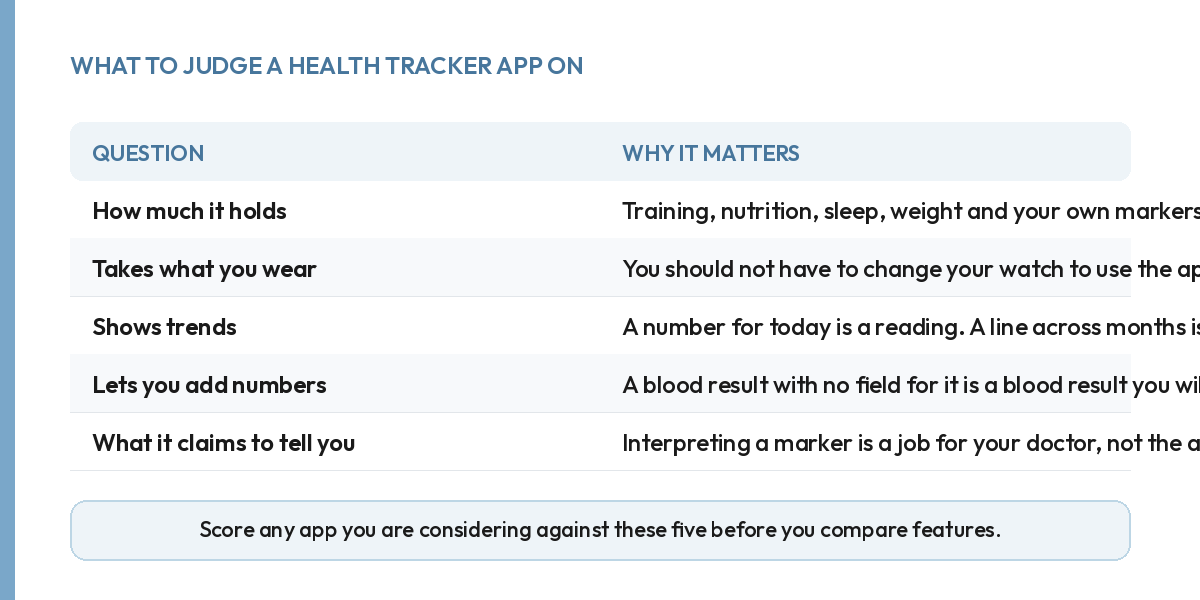
Judge it first on how much of your health it will hold: training, nutrition, sleep, weight, and any markers you type in yourself. If it only holds two of those, you will be opening something else within a month.
It should also take what you already wear, so you are not choosing a watch to suit an app. And it should show trends, not just today. A number for this morning is a reading. A line across three months is information.
Whether you can add your own numbers matters more than it sounds. Fixed panels are the most common limitation in this category, and a blood result your app has no field for is a blood result you will lose.
Last, look closely at what it claims to tell you. An app that interprets a health marker for you is doing something it is generally not qualified to do. This matters even more once lab results and chronic markers are involved, which is its own decision, covered in what to look for in a medical tracking app.
The three kinds of health tracker apps.
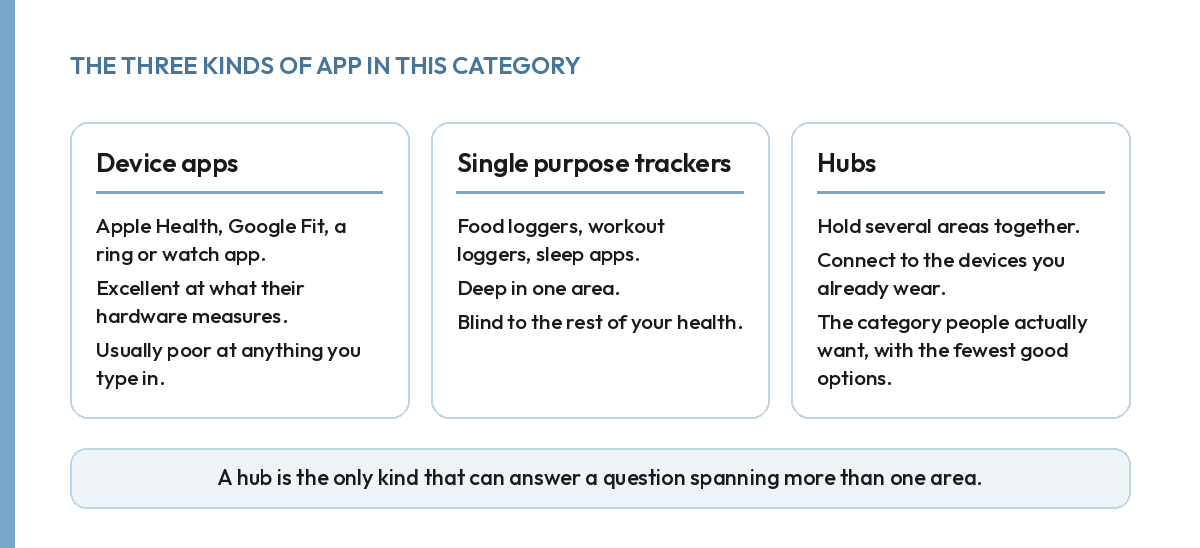
The first kind is device apps: Apple Health, Google Fit, and the apps that ship with a ring or a watch. They are excellent at what their hardware measures and usually poor at anything you have to type in. Most will not hold a lab result at all.
The second kind is single purpose trackers, such as food loggers, workout loggers and sleep trackers. Each is deep in one area and blind to the rest. If you only need a place to log food or a workout log, one of these can be the right call. The gap only shows up once you want to see two areas of your health at once.
The third kind is hubs: apps that hold several areas together and connect to your devices. This is the category people actually want, and the one with the fewest good options.
The Health Project, which we make, sits in the third group. Your training, nutrition and sleep sit in one place. Any marker can be entered by hand or uploaded from a lab report, and it connects with your Apple Health, Google Fit, Garmin, Fitbit, Oura and Whoop. It also tracks VO2 max alongside your training and recovery, rather than as a number sitting on its own in a watch app.
We show you the trend. We do not tell you what a result means. Interpreting a marker is a conversation for your doctor. Any app that offers to do it for you is a reason to be sceptical rather than impressed.
Why is my health data spread across four apps?
Each app was built by a company that wanted to own one piece of it. None of them has any commercial reason to hand your data to a competitor.
The practical consequence is that the questions you most want answered are exactly the ones nothing can answer. Whether your sleep is tracking your training load, whether your resting heart rate drifts in heavy weeks, a food logger cannot tell you. It can tell you what you ate. It was never built to look at your sleep as well.
What switching actually costs you.
The honest cost of moving to a hub is not money, it is history. Your old app has months of logs sitting in it, and most of them will not move with you. Decide what you actually need going forward, rather than trying to preserve everything behind you. A fresh start on the numbers that matter beats a perfect archive you never look at again.
The one thing worth carrying over by hand is your baseline. Take your current weight, your last few lab results, and roughly what your training has looked like for the past month. That gives the new app something to measure change against from day one, rather than a trend line that only starts making sense after a few months of fresh data.
What a first week with a hub should look like.
Connect your watch or ring first, before you type anything in. Most of what a hub needs, sleep, steps, resting heart rate, arrives on its own once the devices are linked. Log your training the way you already train, and do not change your routine to suit the app. Add any recent lab numbers you have on hand. By the end of the week, open one screen and check for your training, sleep and nutrition together. If you still have to check a second app to complete that picture, the hub has not done its job yet.
How to choose, briefly.
Write down the four or five things you actually want to track. Then discount any app that cannot hold all of them, however good it is at one. Try it for two weeks before you commit. Watch specifically whether you keep opening a second app to check something the first one should have shown you. If you do, it has not solved the problem.
FAQ.
What is the best health tracking app?
The one that holds the most of your health in a single place and takes data from the devices you already own.
Can one app track everything?
Close to it. The limit is usually whether you can enter your own numbers rather than only what a device measures.
Do health apps work without a smartwatch?
Yes. Everything important can be entered by hand, and a watch mainly saves typing.
Should a health app interpret your blood results?
Be cautious. Trends and visualisation are useful. Interpretation belongs with your doctor.